 Notion Deck
Notion Capture for Stream Deck
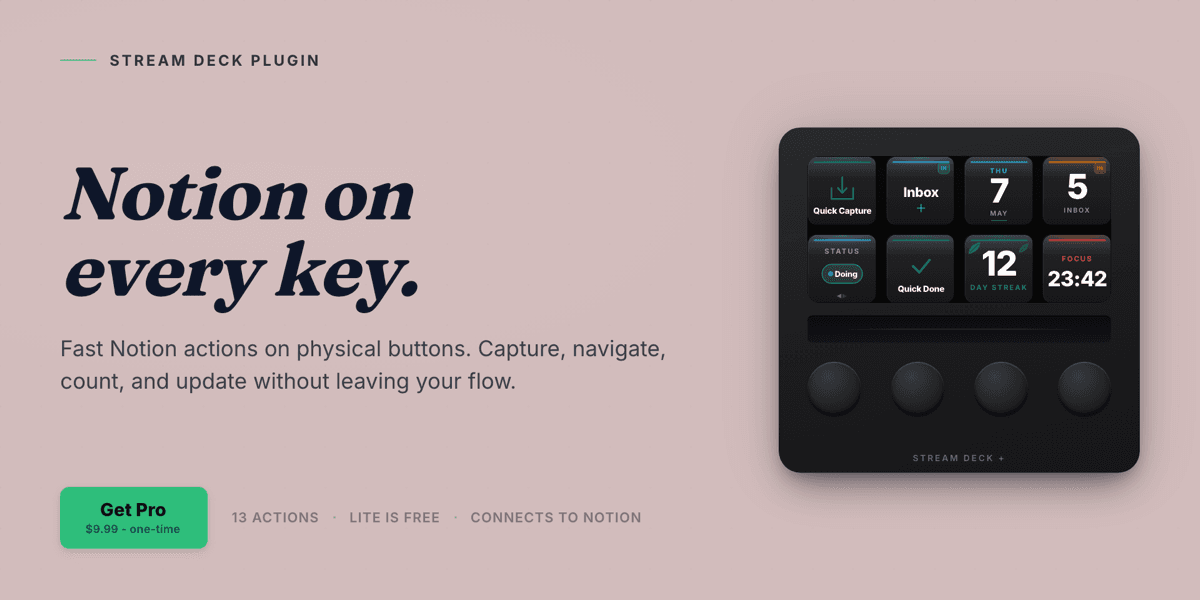
Notion Deck brings Notion to physical Stream Deck buttons: capture straight into any database, jump around your workspace, and watch live record counts update on the keys - no modals, no Cmd+J. It is built around a multi-database capture grid, the piece no other Notion plugin on the Elgato Marketplace offers.
Highlights
How it Works
Connect Notion
Sign in with OAuth or paste an internal-integration token - the same options in Lite and Pro.
Drop an Action
Place a Notion Deck action on a key and point it at the database or page you want.
Tap to Act
Capture, open, count, or cycle straight from the button, with no popup stealing focus.
Go Pro When Ready
Unlock all actions, the Multi-DB Capture Grid, and unlimited keys with a one-time Pro upgrade.
Features
Quick Capture
Tap a key, type one field, hit return, and a new row lands in any Notion database - no Cmd+J, no sidebar hunting.
Multi-DB Capture Grid
Map each key on a page to a different database, so one prompt routes to Inbox, Tasks, Notes, or Ideas without you choosing.
Live Inbox Count
A key or dial shows a live record count that shifts from green to yellow to red as items pile up.
Workspace Navigation
One-tap deeplinks open favorited pages, jump to today's journal, or search Notion and open the result.
Task & Habit Controls
Cycle a status, mark a task done, toggle a checkbox, log a habit, or step a counter - each in a single tap.
Stream Deck + Dials
Encoder support across inbox count, daily journal, status cycle, counter, habit log, and a Notion-logged Pomodoro timer.
Use Cases
Frictionless Capture
Drop a thought into the right database the instant it occurs, without breaking focus.
Daily Journaling
Open or create today's entry from your template with one key.
Inbox at a Glance
Watch your backlog grow in real time and act before it gets out of hand.
Task Triage
Advance, complete, and check off pinned tasks from your desk between deep-work blocks.
Who it's For
Notion power users with a Stream Deck who want their daily capture, navigation, and tracking rituals on physical keys instead of buried in menus.
Ready to try Notion Deck? See it in action.
Visit Notion DeckFAQ
There is a free Lite edition and a Pro edition. A one-time Pro upgrade unlocks all actions, the Multi-DB Capture Grid, and unlimited keys.
Capture straight into any Notion database, jump around your workspace, and watch live record counts update on the keys - across 13 single-tap actions, with no modals and no Cmd+J.
Yes. The Multi-DB Capture Grid maps each key on a page to a different database, so one prompt routes to Inbox, Tasks, Notes, or Ideas without you choosing.
Sign in with OAuth or paste an internal-integration token - the same options in Lite and Pro.
Yes. Encoder support covers inbox count, daily journal, status cycle, counter, habit log, and a Notion-logged Pomodoro timer.
Want something like Notion Deck?
KUBERSTAR designed and built Notion Deck. Tell us what you have in mind and the same team can build it for you.
More to Explore
 GPT Deck
A Stream Deck plugin that sends a prompt plus your selected or copied text straight to ChatGPT from a single key, and brings the reply back where possible.
 Burndown
A Stream Deck plugin that puts your Claude usage on a physical key - what is left of your window, the time to reset, a sustainable pace, and when you will lock out.
 Mac Bluetooth
Run your whole Bluetooth desk from Stream Deck keys on macOS - connect devices, switch sound output and input, mute the mic, and see battery at a glance.
 A Kuberstar Product