 Mac Monitor
macOS Stats for Stream Deck
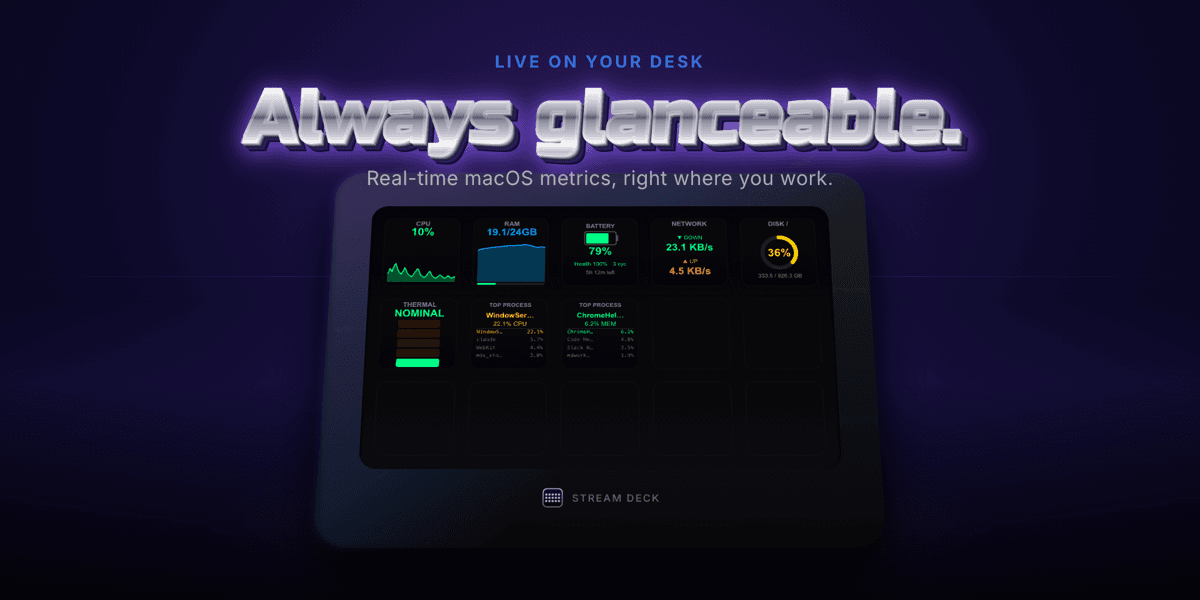
Mac Monitor turns Stream Deck keys into a live macOS dashboard. The free Lite edition covers CPU, RAM, and battery with live charts, custom colors, and adjustable update intervals; Mac Monitor Pro unlocks fourteen more actions - network speed, disk usage, CPU or GPU temperature in degrees, top process, memory pressure, uptime and load average, per-core CPU load, clock speed, connected USB devices, the battery level of paired Bluetooth devices, and Apple Silicon GPU, SoC power, and Neural Engine telemetry - seventeen in all.
Highlights
How it Works
Install the Plugin
Add Mac Monitor Lite free, or Mac Monitor Pro for all seventeen metrics.
Place Your Metrics
Drop CPU, RAM, GPU, power, or any other action onto your keys.
Style Each Key
Set the color, chart style, font size, and update interval per button.
Read at a Glance
Your Mac's vitals render live as charts and gauges on every key.
Features
Core System Vitals
Watch real-time CPU and RAM usage with history charts, plus dedicated memory pressure, uptime, and load average keys.
Battery & Temperature
Track battery level, health, and cycle count, and read the actual CPU or GPU temperature as a number in degrees - not just the system's thermal state.
Network & Disk
See live upload and download speeds and disk usage, with VPN-aware network readings that are not double-counted.
Apple Silicon Telemetry
Read GPU usage, SoC power, Neural Engine draw, efficiency vs performance core load, and clock speed on Apple Silicon Macs.
Top Process & Peripherals
See the busiest app by CPU or RAM with its real icon and press to open Activity Monitor, or list connected USB devices and the battery of paired Bluetooth gear.
Tuned Per Key
Customize accent color, font size, chart style, and update interval independently on every button.
Use Cases
Spotting Slowdowns
Catch a CPU, memory pressure, or temperature spike the moment it happens without opening Activity Monitor.
Apple Silicon Insight
See when on-device AI hits the Neural Engine or the GPU ramps under load.
Battery & Heat Checks
Keep an eye on battery health and the actual CPU or GPU temperature during heavy work.
Try Before You Buy
Run the free Lite edition's core metrics, then upgrade to Pro for the full suite.
Who it's For
Mac power users, developers, and creators who want their machine's vitals - including Apple Silicon GPU and power - live on Stream Deck keys.
Ready to try Mac Monitor? See it in action.
Visit Mac MonitorFAQ
The Lite edition is free and covers CPU, RAM, and battery with live charts. Mac Monitor Pro unlocks fourteen more actions for seventeen metrics in all.
Network speed, disk usage, CPU or GPU temperature in degrees, top process, memory pressure, uptime and load average, per-core CPU load, clock speed, connected USB devices, paired Bluetooth battery, and Apple Silicon GPU, SoC power, and Neural Engine telemetry, on top of the Lite edition's CPU, RAM, and battery.
Yes. On Apple Silicon Macs it reads GPU usage, SoC power, Neural Engine draw, efficiency vs performance core load, and clock speed.
Yes. You can set the accent color, font size, chart style, and update interval independently on every button.
macOS. It turns Stream Deck keys into a live macOS dashboard of charts and gauges.
Want something like Mac Monitor?
KUBERSTAR designed and built Mac Monitor. Tell us what you have in mind and the same team can build it for you.
More to Explore
 Mac Bluetooth
Run your whole Bluetooth desk from Stream Deck keys on macOS - connect devices, switch sound output and input, mute the mic, and see battery at a glance.
 GPT Deck
A Stream Deck plugin that sends a prompt plus your selected or copied text straight to ChatGPT from a single key, and brings the reply back where possible.
 Notion Deck
Single-tap Notion for Stream Deck - capture into any database, navigate your workspace, and live-count records from physical buttons, with no modals.
 A Kuberstar Product